
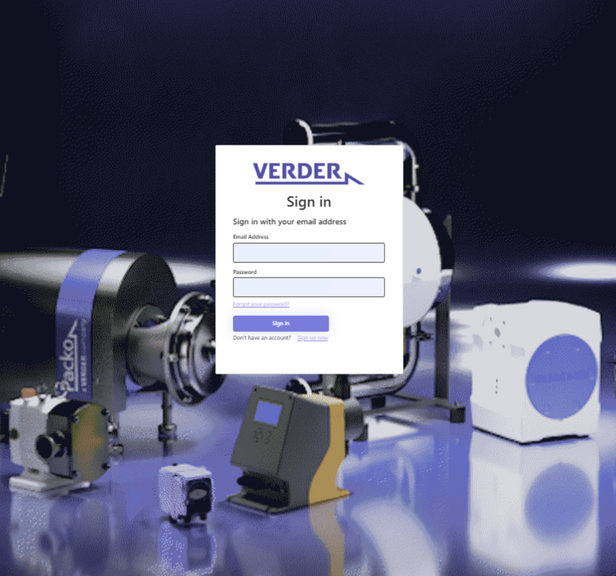
Log in (existing account)
If you already have an account, you can sign in.
How to sign in:
- Enter your email address and password.
- Click “Sign in”.
- Click “Send verification code”.
- Check your email and enter the verification code you received.
- Click “Continue”.
✅ You are now logged in.
Questions About the Portal?
Customer Portal FAQ
-
Will I still have my personal contact person?
Yes. The customer portal complements your personal contact. Your usual sales contacts remain available as before.
-
Is there a charge for using the Verder Customer Portal?
The Verder Customer Portal is a free service for customers. There are no costs for using or accessing the portal. The customer portal is an additional digital order and information channel. Your usual sales contacts remain available for personal exchanges and to handle your business processes as usual.
-
What are the benefits of the Verder Customer Portal?
The Verder Customer Portal enables you to centrally and efficiently manage your pumps, spare parts, and orders throughout the entire lifecycle of your equipment.
o Central overview of pumps, spare parts, orders, prices, delivery status, invoices, and credit notes
o Direct access to all relevant information, documents, and technical data for your installed pumps
o Fast and easy reordering directly from the installed pump or via order history
o Accurate product and spare part selection tailored to your specific installation
o Custom lists, printable overviews, and transparent processes
o 24/7 availability with one‑click ordering
o Secure login
o Long‑term support for your pumps throughout their entire service life
Questions how to log in?
Customer Portal Log In
-
Is the login secure?
Yes. The portal uses email verification and additional security checks during login. When signing in, you will receive a verification code by email that must be entered to access the portal. This helps ensure that only authorized users can log in.
Access to the portal is restricted to approved users from your organization, and each user must create and manage their own account using their professional email address.
-
I don't have access to the customer portal?
If you do not yet have access or are unable to log in, please use our contact form.
-
I forgot my login details – what should I do?
Access to the Verder Customer Portal is managed through individual user accounts with email verification.
Forgot your password?
1. On the login page, click “Forgot password”.
2. Enter the email address associated with your account.
3. Click “Submit”.
4. You will receive an email with a link to create a new password.
5. Follow the link and set a new password.No longer have access to your email address?
Please contact the Verder support team so your access can be reviewed and updated.
-
Are IT security and data protection ensured?
Protecting your data is a top priority for us. The Verder Customer Portal uses modern security standards and email verification to ensure secure and controlled access. Specifically:
- Login requires your individual user account and password
- During login, a verification code is sent to your email address to confirm your identity
- Access is limited to authorized users from your company
- Each user must create and manage their own account using their professional email address
- User access can be deactivated immediately if required
- The portal only accesses the information necessary to provide the service
- This ensures that access to the portal remains secure, controlled and compliant with current data protection standards.
-
How does the login process work?
Access to the Verder Customer Portal is managed through individual user accounts and email verification.
When signing in, you use your professional email address and password. During the login process, a verification code is sent to your email address, which you must enter to complete the sign-in. This additional step helps ensure that only authorized users can access the portal.
This means in practice:
- Access is limited to authorized users from your company
- Each user must create and manage their own account using their professional email address
- Email verification codes provide an additional layer of security during login
- User access can be reviewed and deactivated when necessary
- The portal follows modern security and data protection standards
This approach provides a secure and reliable way to access the customer portal while ensuring that only approved users from your organization can log in.